USD
USD  GBP
GBP  CAD
CAD  INR
INR  AUD
AUD  SGD
SGD 



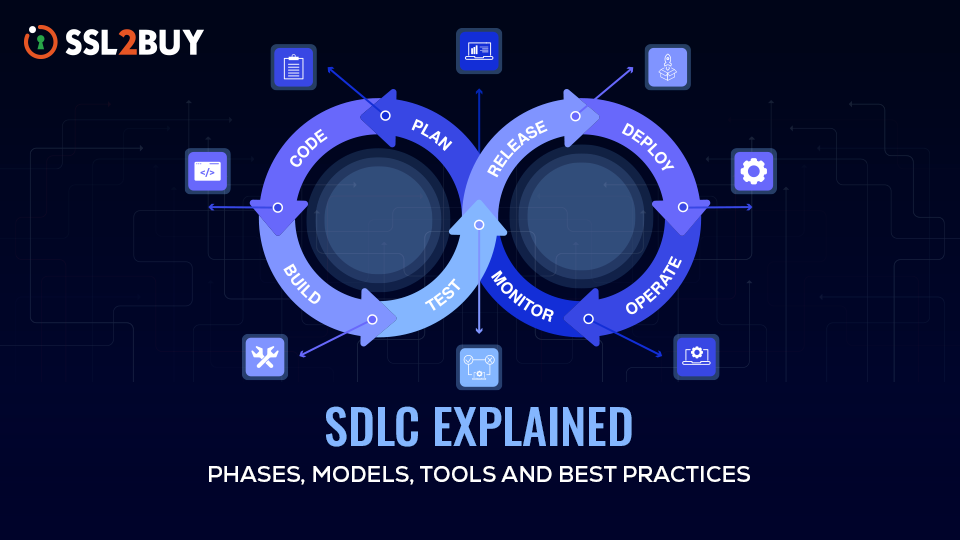
Software Development Life Cycle (SDLC) Guide to Build Scalable Software Systems
As software systems grow more complex, managing the development process becomes mandatory. The Software Development Life Cycle provides a structured standard that helps teams build, test, and maintain reliable applications.
What is Software Development Life Cycle (SDLC)?
Software Development Life Cycle is a framework that shows how software should be built from the concept to a successful product. It breaks development journey into multiple phases like planning, development, testing, and deployment. These phases help teams organize their work, track progress, manage complexity and maintain software quality throughout project.
When this structure is missing, projects often face too many obstacles. Developers start coding before requirements are clear. And when features keep changing halfway through the work, releases become hard to predict. SDLC helps prevent that situation and gives teams a clear way to build software while also reducing development risks.
Why is SDLC Important?
Software Development Life Cycle structure matters even more when systems grow larger. Nowadays, software platforms might offer multiple services, cloud infrastructure, authentication layers, APIs, and external integrations. Supervising all of these moving parts becomes difficult without a structured development lifecycle.
Software Development Life Cycle Stages
The software development life cycle phases describe how a software project moves from initial idea to a working system in production. Every phase controls a specific set of tasks that help teams to maintain software in organized way.

How Software Development Life Cycle Works?
Although teams may follow different SDLC models, the overall process generally follows a structured sequence of stages. The main phases are:
-
Planning and Requirements
The scope of the project is defined in this stage along with what the final product should look like. This involves discussions with product managers, developers and stakeholders. This stage is clarifying what the project or software requirements are.
Functional capabilities, performance expectations, integration needs, and regulatory or security considerations can be some of the requirements. Teams also use this stage to evaluate feasibility, estimate timelines, identify resource needs and document requirements clearly before development.
-
Design
Once requirements are reasonably understood, the next step is designing the system. This is where architects and senior engineers start thinking about structure. What services are needed? How will they communicate? What database model makes sense?
This stage helps define the system architecture, technology stack, and how the application will fit into existing infrastructure, services, or workflows.
-
Development
Only after planning and design the development stage begin. Engineers here implement the features defined earlier. Code is written, APIs are created, databases are structured, and integrations are built.
Large projects often involve multiple engineers working simultaneously across different modules or services. Version control and structured workflows make that collaboration possible.
-
Testing
Testing is necessary as software might not work perfectly the first time. Developers check if the system is behaving as it should. If it does not, then necessary code-level changes are made to fix the issue.
Teams may rely on both manual and automated testing to make sure all parts of the software work together correctly. It includes unit testing, integration testing, system testing, and sometimes user acceptance testing.
-
Deployment
Software is ready to move into production after testing. Deployment can be slow and sometimes a stressful process. In many organizations, releases happen only a few times per year because each deployment carries some risk.
Things look a bit different now. With containerization, infrastructure-as-code, and automated pipelines in place, teams tend to lean on CI/CD. Changes no longer wait for large release cycles. They move steadily through automated pipelines, reaching production in a controlled and reliable way.
-
Maintenance
The work does not stop when a software is deployed. In fact, maintenance often becomes the longest phase of the lifecycle. Production systems require ongoing attention. Bugs appear, new features are requested, software supply chain security checks become necessary as dependencies need updates, and performance issues occasionally surface.
Teams also monitor system performance and user experience after release. As the software evolves, the lifecycle continues again through new planning, development, testing, and deployment work.
Types of Software Development Life Cycle Models
The stages of SDLC remain fairly consistent, but the way teams move through those stages can vary. Different software development life cycle models define different approaches. These are often called software development life cycle methodologies.
SDLC models define how development teams organize and move through the lifecycle phases. Some models follow a sequential path where each stage is completed before the next begins, while others use iterative cycles that repeat as the software evolves.
The model a team chooses usually depends on the project itself, how stable the requirements are, and how teams prefer to manage development and feedback.
Common software development life cycle models include:
- Waterfall Model
- Agile Model
- V-Model
- Spiral Model
- Incremental Model
- Rapid Application Development (RAD) Model
Each of these approaches handles the software development lifecycle a little differently.
-
Waterfall Model

Waterfall follows a fixed sequence. The team starts by defining what the software should do. Then they move into design. After that comes development, testing, and finally release. Each phase happens in that order.
The difficulty shows up when changes appear later. Going back to modify earlier stages can be slow and expensive because the process assumes those stages are already finished.
Projects with stable, well-defined requirements tend to use this model. If the scope stays fixed, the structure works.
-
Agile Model

Instead of building everything at once, agile suggests developing in smaller iterations called sprints. Each cycle produces incremental improvements to the system. This model fits well with modern product development, where user feedback often influences future features.
Agile is designed to adapt more easily to change, which is why it works well for projects where requirements evolve over time and continuous feedback matters.
-
V-Model

The V-Model follows a structure close to Waterfall but places testing alongside development stages. Each phase has a corresponding validation phase. Projects that require strict verification often rely on this model.
Because of this strong verification and validation focus, the V-Model is often chosen when accuracy and testing discipline are critical.
-
Spiral Model

The Spiral model mixes iterative development with risk evaluation.
Every cycle includes planning, risk assessment, development, and testing. The process repeats multiple times as the system grows.
Complex systems often use this model because technical uncertainty is common in those environments. Evaluating risks during each cycle helps teams deal with problems earlier instead of discovering them late in the project.
Large or uncertain projects benefit the most from this approach.
-
Incremental Model

The Incremental model builds software in parts.
The team releases a basic version first. Later increments add new functionality while earlier features remain in place. Over time the product expands with additional capabilities.
Working software becomes available earlier. Teams use this model when they want to deliver usable features early and continue expanding the product gradually.
-
RAD Model

Rapid Application Development focuses on speed and early experiments. Development starts with simple prototypes that see how the system might behave. These early versions are shown to users for feedback.
Based on that, the team adjusts the design and builds improved versions. The process repeats multiple times. RAD works best when quick prototyping and frequent user feedback matter more than long planning phases


Software Development Life Cycle Tools
Tools are what make the SDLC process practical. Even well-defined SDLC processes become difficult to maintain without proper tooling when multiple teams are involved. Modern development teams rely on several categories of tools to support different stages of the software development lifecycle.
-
Version Control Systems
Instead of developers sending code files back and forth, version control systems keep everything in a shared repository. Every change to the code gets recorded there. This makes it easier for teams to work together, track what changed, and go back to earlier versions if needed.
Common version control tools include
- GitHub
- GitLab
- Bitbucket
-
CI/CD Pipelines
Continuous Integration and Continuous Delivery pipelines manage the automation of software development and server deployment. Workflows are executed by these pipelines each time code-level modifications are added to the repository. These pipelines automatically trigger processes such as building the application, running automated tests and preparing system for deployment.
Popular CI/CD tools include
- Jenkins
- GitHub Actions
- GitLab CI/CD
-
Testing and Quality Assurance Tools
Testing tools are used to check whether new code is working properly or not. Developers and QA engineers use them to ensure that different parts of the system work correctly together.
Common testing tools include
- JUnit
- PyTest
- Selenium
-
Monitoring and Logging Platforms
Once software is deployed, monitoring tools help engineers track system performance and detect issues. These tools collect operational metrics like usage of CPU, request latency, number of errors and overall application throughput.
Detailed event records generated by applications are logged by logging platforms. Monitoring and logging allow engineers to diagnose problems quickly.
Common monitoring and logging tools include
- Prometheus
- Grafana
- Datadog
- ELK Stack
-
Issue Tracking and Project Management Tools
Issue tracking systems provide developers with a centralized dashboard where they can manage development workflows such as tracking tasks, bugs, and feature requests. These tools also support workflow management through features like sprint planning, task assignment, and progress tracking.
Common tools used in development teams include
- Jira
- GitHub Issues
- GitLab Issues
- Trello
The Role of Software Development Life Cycle in Modern Systems
SDLC forms the backbone of reliable modern software systems. Software systems today are rarely small. Even relatively simple applications may run across multiple services, cloud platforms, APIs, and integration layers.
SDLC provides the structure needed to manage that complexity. A well-defined lifecycle improves reliability because every stage includes validation before changes reach production.
It supports scalable architecture by encouraging thoughtful design and controlled evolution of systems. It also allows teams to introduce updates without destabilizing the platform.
In large organizations, SDLC creates coordination between development, operations, and product teams. Everyone works within the same structured workflow. For cloud platforms, SaaS systems, and enterprise infrastructure tools, that coordination becomes essential.
Modern DevOps environments often integrate SDLC practices with CI/CD pipelines so that development, testing, and deployment happen in a controlled and repeatable way.
Best Practices in Software Development Life Cycle
Experienced teams also rely on practical SDLC best practices rather than just sticking to lifecycle stages
- The most valuable starting point is clear requirements. Unclear expectations and requirement creates multiple development problems.
- Software features should not be too tightly coupled. Keeping components loosely connected helps maintain a modular structure.
- Instead of treating testing as the last thing, it should be integrated into the development pipelines for continuous testing.
- It is important to monitor systems after deployment. This gives insights into how the software is actually performing in real-world scenarios.
- Finally, teams benefit from iterative improvement. Feedback from users, metrics from production systems, and internal engineering reviews all contribute to better future releases.
Looking Ahead: The Growing Importance of Secure Software Development Life Cycle
Most applications rely on APIs, external services, and third-party platforms to function. Software today is rarely built in isolation. As such intercommunication grows, the complexity of the system and the attack surface grows and open up opportunities for malicious actors. Attackers try to exploit the development process itself, as security is often kept as the last thing to work on. Because of this, organizations have been moving towards secure SDLC. Security is now checked not only at the end but also during planning, development, testing, and deployment. This shift toward DevSecOps ensures that security becomes part of the development workflow rather than an afterthought.