

 USD
USD  GBP
GBP  CAD
CAD  INR
INR  AUD
AUD  SGD
SGD 

The Growing Confusion Between Real and Fake Emails
In the not-too-distant past, there was a simple health check for emails landing up in inboxes. If it looks professional, it’s most likely the real deal. Unfortunately, things are not so simple anymore.
Say hello to AI-driven phishing. Emails are now better written, more contextual, timely, and relevant than before, and malicious emails contain [1] twice as much AI-generated text, with tone, grammar, structure, and personalization that are absolutely on point. Also, the scale of phishing attacks has increased dramatically, up to [2] 140% year-on-year.
This article aims to break down the reasons behind the erosion of inbox trust and the reasons why users are getting confused.
Generative AI: The Evolution of Phishing
There is a difference between polish and precision at scale. AI had helped with the latter, with attackers being able to generate personalized emails for thousands of people at once. Generative AI has put one-off phishing emails in the bin, with attackers resorting to natural conversations within the framework of how teams function and communicate through emails.
Here’s what has changed on the ground, with AI:
The Writing No Longer Gives Attackers Away
Clean grammar and professional tone are used to help sift fake from real. Microsoft’s [3] data shows AI-automated phishing can outperform standard phishing by a wide margin, which is exactly why it’s spreading.
Personalization at Scale is Now Normal
AI can stitch together details from public footprints like LinkedIn, company websites, press updates, and org pages, then produce a message that sounds like it was written for one person, not a list.
Dynamic “context” That Feels Comfortably Real
The message will have name, job title, team references, recent company initiative, and even lines that look like they’re reacting to something you posted or worked on. The email feels familiar because the inputs are real, even if the sender isn’t.
Multi-touch Campaigns Mimic Real Business Behaviour
AI can generate a believable sequence. First email is a gentle nudge, “checking if you saw this,” then a sharper follow-up that references a “previous note.” That pattern matches real internal and vendor communication, so it lowers suspicion over time.
Replies Don’t Always Break the Illusion Anymore
If the target responds, AI can draft a contextually appropriate answer quickly, staying in tone and on topic long enough to get to the actual goal, which can include credentials, payment details, document access, and approval.
Attackers Now A/B Test Campaigns
Multiple variants of subject lines, opening lines, levels of urgency, and types of asks go out. The best-performing version wins, and the campaign shifts immediately. Microsoft notes AI automation can raise phishing profitability by up to [3] 50× by scaling highly targeted attacks at minimal cost.
Defenders Are Dealing with Speed, Not Just Volume
Security teams have to tune controls, update detections, retrain users, and align policy. Attackers can iterate faster than those cycles. The feeling of ‘not being able to catch up’ never goes away, illustrated by the fact that around [1] 60% of breaches are still caused by human error.
Tangible Business Damage
In the FBI’s reporting, FBI Internet Crime Complaint Center lists Business Email Compromise losses at [4] $2,770,151,146 with 21,442 complaints. That’s what a crashing inbox trust can lead to when users are unsure what to trust.
Visual Deception: Lookalike Domains and Display-Name Tricks
Attackers don’t need to fool readers with email copy alone. They prey on user psychology to convince them to take a wrong step. This is where visual deception enters the picture.
- Take the case of domain spoofing, which no longer looks like a crude forgery but is carefully constructed. Phishing domains can now survive a fast scan. Imagine a very busy employee getting an email from micrOsoft.com or micros0ft-secure.com. A cursory examination won’t pick up the difference, and it will be waved through.
- Attackers can also trick users with subdomain complexity. They put the trusted brand name at the front, e.g., legitimate-company.attacker-domain.com. Users see “legitimate-company,” but the one to watch out for is the ending: attacker-domain.com. They do something similar with top-level domains, using near-identical addresses such as company.co instead of company.com or company.net instead of company.org. Each change is small, but when you’re moving fast, those tiny differences are easy to miss.
- Our brain is also wired to focus on highlighted items, another behavior exploited by attackers. In most inboxes, you find that the sender’s display name is highlighted, which is the first thing users notice. They don’t take notice of the actual email address, which is many a time hidden within extra taps.
Visual deception works because people don’t read email addresses character by character. They scan for visual patterns.
Even careful users get caught here, and it’s not because they’re careless.
- First cognitive shortcut, then analysis: Familiar names trigger trust automatically. The brain makes a snap judgment before it processes the underlying details.
- Inbox volume erodes attention: The average employee receives hundreds of emails per day, which makes deep inspection of every sender unrealistic. No surprise that in this situation, speed wins over caution.
- Legitimacy cohabits with messiness: Real businesses send emails from CRMs, ticketing systems, marketing platforms, payroll tools, and vendors, often using unfamiliar domains. That normalizes “odd-looking” sender addresses and trains users to ignore small inconsistencies.
- Verification doesn’t scale: In theory, users could expand headers, check domains, and confirm identities every time. In practice, doing that would cripple productivity. So, people rely on visual trust cues instead.
Thread Hijacking: Borrowing Credibility from Real Conversations
A major reason is that users are unable to detect legitimate emails because attackers are now hijacking legitimate email threads. Yes, phishing is not limited to imitation anymore. A real mailbox of an employee, vendor, or partner is hijacked (read: compromised), and all conversations are now visible to the attacker. Without anyone noticing, they are now watching the conversation unfold. They are getting clarity on the tone, the nature of the conversation, its cadence, context, and decisions made on the basis of this conversation. At the opportune time, they add a malicious message to an ongoing conversation. This deception is natural and part of a legitimate conversation, and does not raise eyebrows.
Thread hijacking is undetectable because the illegitimacy originates from the thread; there are no fake participants, and the message is relevant and timely.
Legitimate Senders Breaking Their Own Trust
Sometimes it’s the businesses themselves that make it more difficult to fight phishing. They rely on a patchwork of tools, domains, and templates that confuse users and gradually erode trust in the inbox.
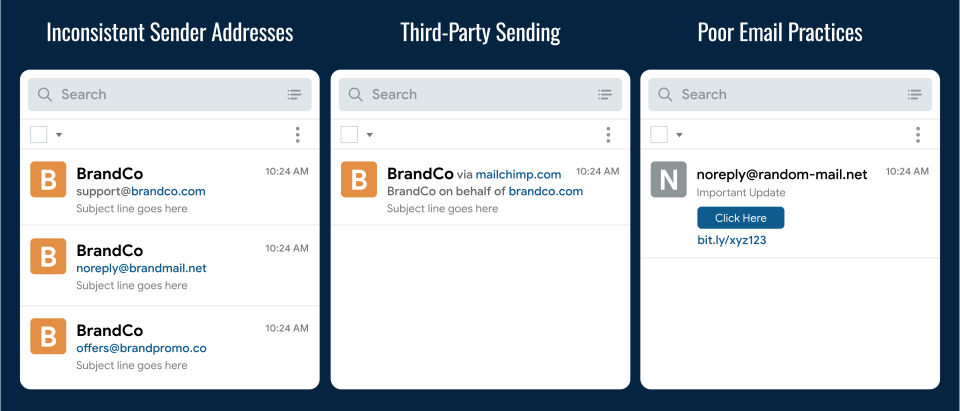
There are three avoidable issues that cause a breakdown of trust:
A Rotating Case of Addresses
Unintentional distrust has no cure. Businesses send various kinds of emails, e.g., password receipts, transaction receipts, marketing campaigns, product release updates, and more, from different senders. Users are therefore unable to form a reliable mental model of what legitimate emails from a particular business will look like, leading to confusion and avoidable ignores, or clicks.
Third-party Platforms
Companies send emails through third-party platforms like Mailchimp, SendGrid and others, which can introduce ‘via’ or ‘on behalf of’ labels or unfamiliar domains in the sender line. This means a legitimate email can appear suspicious because it is “designed” that way.
Poor Email Hygiene
Generic no-reply addresses remove the easiest verification path. Also, at times, due consideration is not given to email branding, and it appears unprofessional. There is also a tendency among brands to be vague about the action that needs to be taken, and it reads like a phishing email. Add shortened URLs and tracking links that hide the true destination, and even careful users are left with one option: guess, click, and hope they guessed right.
Security Solutions Restoring Trust
You can’t depend on ‘guesswork’ alone, and the commitment of the user to sift the good from the bad when it comes to the inbox. The baseline security solutions remain the same, which include a secure email gateway or cloud email security, which guards the gates of your inbox. It takes care of spam filtering, malware, sandboxing, behavioral anomalies, and impersonation patterns before the user even begins to scan the inbox.
But from here, the focus should be on authentication, a core layer in inbox trust. SPF and DKIM help the email ecosystem check whether the sender is authorized and the message was altered in any way during transit. DMARC ties it all together by enforcing alignment and the next steps if a check fails. Well-implemented DMARC ensures that lookalike emails do not reach the inbox.
With DMARC protecting the domain behind the scenes, BIMI brings that trust to the surface by showing a verified brand logo to recipients. BIMI (Brand Indicators for Message Identification) lets supported inboxes show your brand logo next to your messages. To make sure the logo isn’t just something anyone can upload, BIMI is typically backed by a Mark Certificate that proves you actually have the right to use that brand mark:
- VMC (Verified Mark Certificate): If you have a registered trademark, you go with the VMC Certificate, which is the higher-assurance option and can even trigger Gmail’s verified checkmark for some senders.
- CMC (Common Mark Certificate): Instead of trademark proof, it relies on showing at least 12 months of prior public logo use on a domain you control, so more brands can still qualify for BIMI without waiting on trademark registration.
Security tools also translate these checks into human signals, such as verified sender badges, warning banners, or trust scores displayed directly in the inbox. And for high-assurance workflows, digital signatures add a cryptographic seal so you can verify the email really came from the sender and wasn’t changed along the way. And finally, the domain reputation score is a transparent layer that works behind the scenes to triage sender history, infrastructure signals and threat intelligence to flag new or risky domains.
To Conclude
Inbox trust isn’t coming back by just asking employees to be careful. The changing email game has changed, which means you need a mix of human agency and security layers to ward off evil. The way forward is to tighten your sending hygiene, lock down authentication, and let security layers do the heavy lifting before messages ever reach a click.
Related Articles:
- Why is Your Inbox a Primary Cyberattack Vector?
- BIMI, VMC and CMC Certificates: Facts & Trends Shaping Inbox Trust
- SPF, DKIM and DMARC: How to Align All Three for Maximum Protection
- Email Authentication is Moving the Inbox to Verified Senders
References:
[1] Data Breach Investigations Report 2025
[2] CyberSecurity News
[3] Microsoft Digital Defense Report 2025
[4] Federal Bureau of Investigation Internet Crime Report 2024















