


 USD
USD  GBP
GBP  CAD
CAD  INR
INR  AUD
AUD  SGD
SGD SSL Certificate for IP Address
Get a publicly-trusted SSL/TLS certificate issued directly to your public IP address – no domain name required. Secure APIs, IoT devices, load balancers, and public-facing servers with the same encryption strength as any domain certificate.
IPv4 & IPv6 Support
Free Expert Support
What is an SSL Certificate for an IP Address?
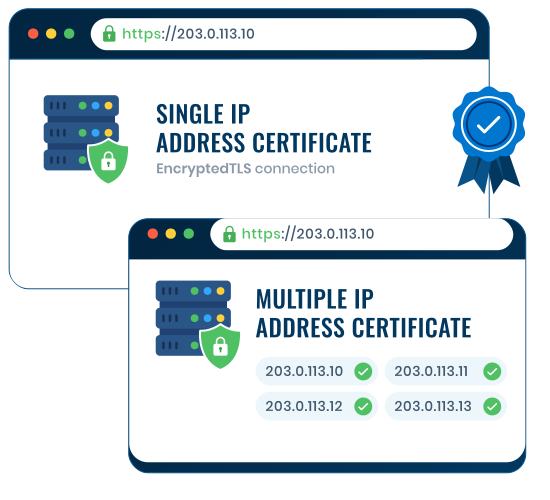
An SSL certificate for an IP address is a publicly trusted TLS certificate issued directly to a public IPv4 or IPv6 address. Instead of matching a domain name, the certificate identifies the IP through an iPAddress entry in its Subject Alternative Name field.
This allows browsers, applications, and API clients to authenticate and encrypt a connection made directly to an IP address. It uses the same standard TLS connection model as a domain certificate; the identifier being verified is different.
Two Ways to Secure Your IP Address
Whether you’re protecting a single server or a whole fleet of IPs, there’s a plan sized for the job — no unnecessary features, no confusing tiers.

IP Address SSL Basic
Single public IP address SSL — built for a single API endpoint, admin panel, IoT device, or standalone server.
- Secures one public IPv4 or IPv6 address
- Domain Validation through IP control
- IP included as an exact SAN entry
- Public browser and operating-system trust
- Free certificate installation support

IP Address SSL Pro
Place multiple eligible public IP addresses on one certificate for simpler deployment and tracking.
- Secures multiple public IPv4 or IPv6 addresses
- Domain Validation for every listed IP
- Each IP included as a separate SAN entry
- One certificate for multiple endpoints
- Free certificate installation support
Built for Infrastructure Accessed Through an IP Address
Protect public-facing devices and services that users, systems, or applications access directly through an IPv4 or IPv6 address.

APIs & Microservices
Encrypt server-to-server and partner API connections made directly through a public IP endpoint.

IoT & Network Devices
Protect eligible public-facing appliances, gateways, and device interfaces configured for direct IP access.

DNS-over-HTTPS Resolvers
Protect encrypted DNS resolver endpoints configured to accept TLS connections directly through a public IP address.

Load Balancers & Reverse Proxies
Protect public listener addresses across load balancers, reverse proxies, regions, or service endpoints with one multi-IP certificate.

Mail & SMTP Gateways
Secure relay and gateway endpoints that route mail traffic directly by server IP.

Direct-IP TLS Endpoints
Present a certificate that matches the requested IP address when a client connects without using a DNS hostname.
Public vs. Private IP Addresses: What’s Allowed
✕Private / Reserved IPs
Public Certificate Authorities cannot issue publicly trusted SSL certificates for private, reserved, or internal-only addresses.
- Private ranges include 10.0.0.0/8, 172.16.0.0/12, and 192.168.0.0/16
- Internal names such as
.local,.internal, and.corpare not eligible - These addresses cannot be included in a publicly trusted certificate
- Use a private PKI or internally trusted certificate instead
✓Public IP Addresses
A publicly routable IPv4 or IPv6 address can qualify after the requester proves control of it.
- The address must be public and globally routable
- Control is verified through HTTP file-based validation
- Both IP Address SSL – Basic and Pro use Domain Validation
- Each IP appears in the SAN field using the
iPAddressname form - A stable IP is recommended because changing the address requires certificate replacement
How to Get Your IP Address SSL Certificate
Confirm eligibility, choose coverage, and validate control of every public IP address included in your certificate.
Choose Your Plan
Pick Basic for one public IP or Pro for multiple public IP addresses on one certificate.
Generate Your CSR
Generate a private key and Certificate Signing Request on the server, appliance, or system where the certificate will be installed.
Verify IP Control
Place the CA-provided verification file at the specified HTTP path for each requested IP. Email and DNS validation are not used for IP addresses.
Certificate Issued
Once every IP passes Domain Validation, the CA issues the certificate for download and installation.
Install & Go Live
Install the certificate and intermediate chain on your server, load balancer, gateway, or appliance. SSL2BUY support is available if you need help.
Free IP Certificates vs. SSL2BUY IP Address SSL
Yes, free short-lived IP certificates now exist. Here’s exactly what you’re trading off.
Free IP Certificates
- Validity capped at 160 hours; frequent automated renewal is required
- Requires an ACME client that supports IP addresses and short-lived certificates
- Issuance, deployment, and renewal must be automated and monitored
- Better suited to teams with mature certificate lifecycle automation
SSL2BUY IP Address SSL
- Annual per-IP plan with certificate reissuance during the subscription term
- Works with standard installation methods on compatible servers & appliances
- Choose Basic for one public IP or Pro for multiple public IP addresses
- Backed by 24/7 human sales and technical support
Ready to Secure a Public IP Address?
Choose single-IP or multi-IP coverage—or ask an SSL specialist to confirm the right fit.
SSL Certificate for IP Address — Frequently Asked Questions
Detailed answers on IP Address SSL Certificates, including public IP eligibility, validation requirements, coverage options, and pricing.


