 GBP
GBP  CAD
CAD  INR
INR  AUD
AUD  SGD
SGD 
Prime CMC Certificate
Put your brand logo beside authenticated emails with Prime’s competitively priced CMC.
Starting at $650.00/ year
 Verified Logo & Email Blue Tick from

 USD ($)
Put your brand logo beside authenticated emails in supported inboxes with a Common Mark Certificate (CMC). The certificate links your logo to your organization and sending domain, giving mailbox providers the verification needed for BIMI logo display.
Explore Prime, Sectigo, and DigiCert CMC offers to find the right price and issuer for your brand. A registered trademark isn’t required, though your logo must meet the issuer’s eligibility requirements.

Find the Common Mark Certificate that fits your email branding plans. Review Prime, Sectigo, and DigiCert offers, including pricing, subscription terms, and issuer details.
Put your brand logo beside authenticated emails with Prime’s competitively priced CMC.

Display your approved logo in supported inboxes with a Sectigo-issued CMC.

Bring your brand logo to BIMI-supported inboxes through DigiCert’s CMC validation.

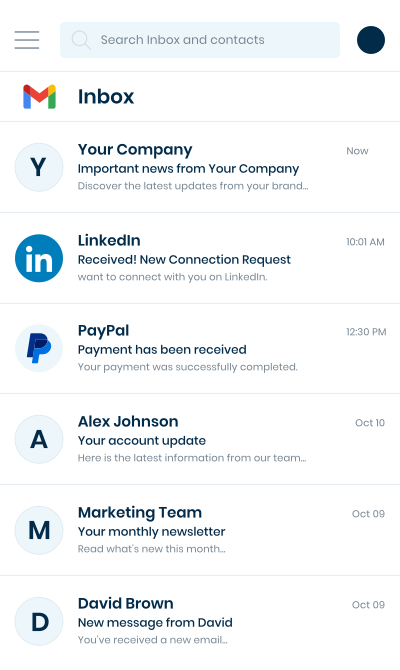
A CMC lets your approved brand logo appear beside authenticated emails in BIMI-supporting inboxes, including Gmail and Yahoo Mail. This gives customers a visual way to recognize your messages.

A registered trademark is not required. Brands can qualify with a logo that has been in public use for 12+ months, subject to the issuer’s review.

CMCs generally cost less than VMCs, making inbox logo display more accessible to brands that do not need trademark-based verification or Gmail’s blue checkmark.

The issuer checks evidence of your logo’s prior use without a trademark registration check. Your organization, domain, and applicant still go through certificate validation.

CMC logo display works alongside BIMI and enforced DMARC. This connects the logo shown in supported inboxes with email sent from your authenticated domain.

A familiar logo helps recipients identify your emails among other inbox messages. It can make order updates, account notices, and campaigns easier to recognize and engage with.
A CMC suits organizations that send regular customer, member, or community emails and want their established logo to appear in supported inboxes. It gives brands with an eligible logo a way to make those messages easier to recognize.

Local retailers, service providers, and regional brands send offers, receipts, and service updates. A consistent inbox logo helps customers recognize those messages.

Startups that have used the same logo publicly for at least 12 months can bring it into supported inboxes as their customer email volume grows.

Schools, colleges, and training providers send admissions updates, course notices, and alumni emails. Their logo helps recipients identify messages from the institution.

Organizations sending appeals, event invitations, and member updates can show a familiar logo beside eligible emails, helping supporters recognize who contacted them.
The usual route is to show that your organization has used the logo publicly for over a year and still displays it on a website it controls. The issuer checks the evidence against the logo submitted for the certificate.
A dated website snapshot, such as one in the Wayback Machine, can show the logo in public use at least 12 months before verification.
The same logo should appear on your current website, so the issuer can confirm it remains part of your brand identity.
The SVG submitted for the CMC must match the logo shown in your supporting evidence. Changes to the artwork may need additional review.
The historical and current website evidence must connect the logo to your organization and a domain it controls.
Some CAs also accept applications based on a logo substantially similar to a registered trademark. This is an issuer-specific option to check if you lack 12 months of prior-use evidence.
Getting a CMC involves confirming your logo’s eligibility, preparing its BIMI file, checking email authentication, and completing organization validation. SSL2BUY can help you meet these requirements as your order progresses.
Under the prior-use route, the submitted logo must have appeared publicly for at least 12 months. Archived web pages can provide evidence of that use.
The eligible logo must be a square SVG Tiny P/S file without scripts or embedded images. The file is hosted over HTTPS for BIMI.
The sending domain must have a fully applied p=quarantine or p=reject DMARC policy.
Mail from the domain’s sending services must pass DMARC through aligned SPF and DKIM authentication.
The certificate authority checks the organization’s registration and contact details against official records.
An authorized person from the organization completes the certificate authority’s identity check.
Order your CMC from SSL2BUY and our team will guide you through your logo, email setup, CA validation, and BIMI publishing.
Select Prime, Sectigo, or DigiCert and choose your subscription term. Enter your organization and email-domain details to begin the CMC application.
Prepare an SVG Tiny P/S logo and evidence of 12+ months of public use. Check SPF and DKIM alignment, with DMARC enforced at p=quarantine or p=reject.
The CA checks your organization, domain control, and logo eligibility. An authorized representative completes the required identity check.
Once approved, the CA issues your CMC. Host the certificate and matching SVG logo at public HTTPS URLs for your BIMI setup.
Add the BIMI record to your domain’s DNS. Supported inboxes can then display your brand logo alongside authenticated emails.
Get competitive CMC pricing with help on logo eligibility, issuer validation, and BIMI setup – all through SSL2BUY.

Get help with logo-use evidence, application details, and issuer queries. Our team helps you work through validation and avoid unnecessary delays in receiving your CMC.

We offer a 30-day money-back guarantee on eligible CMC orders. If you cancel before the certificate is issued, we’ll help with your refund.

Choose from Prime, Sectigo, and DigiCert CMC offers at competitive prices. Available discounts and plan options help you find an offer that fits your budget.

SSL2BUY’s support team is available 24/7 to answer CMC questions and help with logo files, email authentication, and BIMI setup.

Your CMC needs annual renewal, including when you choose a multi-year plan. Keeping it current supports continued logo display in supported inboxes. During renewal, the issuer may recheck your organization, domain control, and logo eligibility.
SSL2BUY can help you renew your CMC, work through updated validation requests, and guide you through certificate hosting and BIMI record updates after issuance. Starting ahead of expiry allows time for renewal and helps avoid an interruption in your email logo display.
Find answers to common questions about CMC logo eligibility, inbox display, pricing, validation, and renewals.


