CAD
CAD  USD
USD  GBP
GBP  INR
INR  AUD
AUD  SGD
SGD 

Azure Key Vault Code Signing Certificate at CA$752.13
Buy Azure Key Vault Code Signing Certificate from Authorized Distributor
Azure Key Vault Code Signing lets you sign apps, installers, and scripts directly in Microsoft Azure. Your private key is generated and locked inside Azure Key Vault’s FIPS 140‑2 Level 3 HSM. No USB tokens, no on-premise hardware, and no risk of key export. For software developers, DevOps teams, and enterprises adopting CI/CD workflows, it meets compliance standards, protect brand reputation, and simplify code signing from anywhere. Secure your code with DigiCert trust at the best price.

publisher name

Validation

tampering

key storage
refund policy

no hidden fees
checkout
Guaranteed Cheapest Price
|
Select Subscription

Select a multi-year subscription model based on your budget to save additional costs on your certificate.
|
|
|---|---|
|
Certificate Delivery Method
Hardware must meet FIPS 140-2 L2 or EAL 4+ for key storage.
|
|
|
Quantity
Select how many certificates you need, and the total number of certificates in your order will be displayed.
|
|

 4.8/5 stars based on 15813 reviews
Azure Key Vault Code Signing Certificate for Cloud-Based Signing
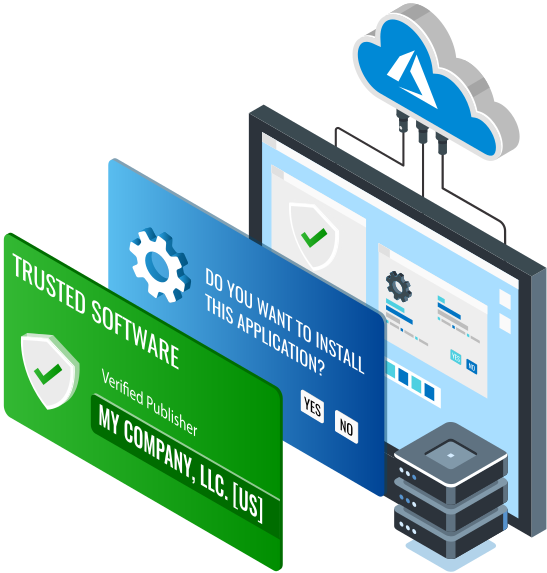
Azure Key Vault Code Signing Certificate is an organization-validated digital certificate bound to Microsoft Azure Key Vault’s FIPS 140-2 Level 3 HSM. It does not require a USB token or on-premise hardware; instead the private key is generated and stored entirely in Azure’s secure cloud infrastructure and is never exportable.
When you integrate with Azure Key Vault, you can digitally sign software, executables, drivers, and scripts directly in the cloud, using the Azure CLI, PowerShell, REST API, or automated CI/CD pipelines. This way your code is authenticated, tamper-proof, and industry standard compliant but without the physical key management complexity.
- Native Microsoft Azure Integration
- Non-Exportable Keys
- Role-Based Access via Azure AD
- Built-In Timestamping
- Azure DevOps & CI/CD Ready
- Detailed Audit Logs
- Broad Platform Support
- Token-Free Signing from Any Location
| Product Features | |
| Certificate Technical Name | DigiCert Code Signing Certificate |
|---|---|
| Product SKU | S2BDIG527 |
| Certificate Cost | CA$752.13 |
| Certificate Authority | DigiCert |
| Category | Code Signing Certificate |
| Delivery Method | Azure KeyVault Hardware Security Module |
| Vendor Refund Policy | Till 30 – Days (If Not Issued or Dispatched) |
| Technical Support | Free Live Chat and Ticket Support |
| Installation Service | Purchase on Demand |
| Technical Specifications | |
| Validation Method | Organization Validation |
|---|---|
| Key Storage | Cloud HSM (Azure) |
| Delivery Time | 5 to 7 Days |
| Supported Key Type(s) | RSA, ECC |
| Supported Key Length(s) | 3072-bit or 4096-bit |
| Hash Algorithm | SHA – 2, Up to 256-bits |
| Software Signing | Unlimited |
| Certificate Reissuance | Unlimited (exluding token) |
| Hardware Certification | FIPS-140-L2 |
| Includes Publisher Identity | Verified Organization Name |
| Time Stamp | Compatible |
| Instant Reputation w/ MS Smartscreen Filter | No |
| Supported Platforms | Java, Microsoft Authenticode, MS Office Document, Adobe Air, MS VBA |
Azure Key Vault Code Signing in 4 Easy Steps
Register an Azure Application
In Azure AD, register a new app and save the Client ID.
Create a Client Secret
Generate a secret in Certificates & Secrets for signing credentials.
Grant Key Vault Access
Add an access policy, enable Sign and Get, assign your app as principal.
Sign Your Code
Use Azure Sign Tool with Key Vault URI, certificate name, Client ID, and secret.
Benefits of Azure Key Vault Code Signing Certificate
Cloud-Native Code Signing

Integrated Developer Workflow

Trusted Azure Environment

an Affordable Price!

Cheap Azure Key Vault Code Signing Certificate
Role-Based Access & Control

Content Integrity Protection

Detailed Audit & Monitoring

Scalable for Enterprise Workloads

Azure Code Signing Compatibility
Azure Key Vault Code Signing FAQs
How much does Azure Key Vault Code Signing cost?
What is Azure Code Signing 21H2?
How can I control who can sign using the certificate?
How does Azure Code Signing work?
What are the prerequisites for using Azure Key Vault Code Signing?
To meet ACS requirements, your environment must have:
- A supported Windows version – Windows 11 or Windows 10 (versions 21H2 or later) with ACS support enabled
- An active Azure subscription with Azure Key Vault or Microsoft Trusted Signing enabled
- Azure CLI or other ACS-supported signing tools for submission
- OV validation from a trusted CA
You can buy Azure Key Vault Code Signing Certificate from SSL2BUY, DigiCert’s authorized partner, and save on direct CA pricing.
Discover similar or upgraded options

- Displays Publisher Name
- Code & App Signing
- Individual Developer Eligibility
- Prevent Code Tampering

- Displays Publisher Name
- Code & App Signing
- Individual Developer Eligibility
- Prevent Code Tampering
- Displays Publisher Name
- Instant SmartScreen Reputation
- Two-factor Authentication
- USB Token Storage