


 CAD
 USD
 GBP
 INR
 AUD
 SGD
DMARC Monitoring and Reporting for Your Domain
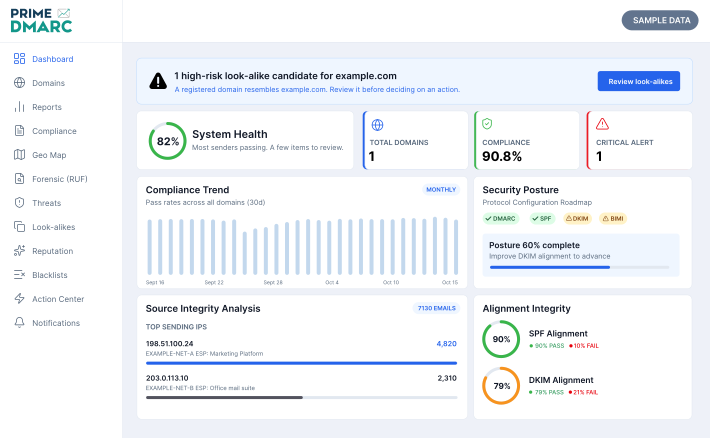
Prime DMARC brings sending sources and email authentication results into one clear dashboard. Turn complex DMARC reports into a readable view of domain activity, authentication failures, and trends.
Investigate unfamiliar senders, identify SPF and DKIM alignment issues, and prioritize what needs attention. Use these insights to assess readiness for DMARC enforcement and make informed policy decisions.
Centralized Authentication Insights
Domain Risk Visibility
Informed DMARC Policy Decisions
What Does a DMARC Monitoring Service Do?
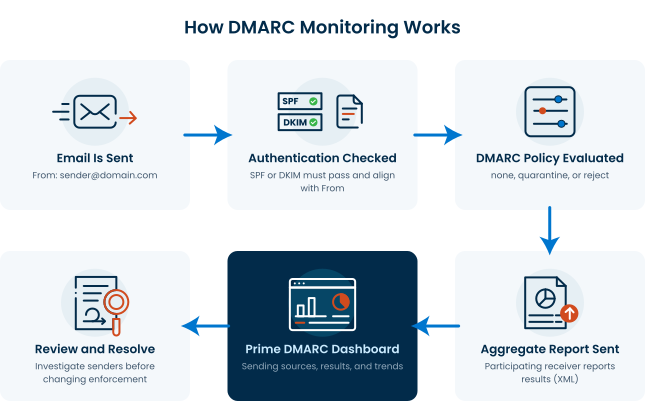
A DMARC monitoring service collects authentication reports from participating email providers and turns them into readable results. These reports show which sources are reported as sending email using your domain, whether messages pass DMARC, and how receiving systems handle them.
Prime DMARC groups reported activity by sending source and highlights authentication results. This helps you investigate unfamiliar sources and find legitimate services that need configuration changes before tightening your policy.
DMARC monitoring provides visibility. Your published policy tells receiving systems how you want messages that fail DMARC to be treated.
Tools for DMARC Reporting and Domain Monitoring
Prime DMARC brings authentication reports, sending-source analysis, and domain monitoring into one platform. Explore the tools available to investigate issues and prioritize what needs attention. Feature availability depends on the selected plan.

DMARC Report Analyzer
Turn aggregate reports into readable views of sending sources, authentication results, and reported message handling.

Sending Source Analysis
Review source labels such as Authenticated, Unknown Sender, No Alignment, and Forwarder to prioritize investigation.

Authentication Trends
Track DMARC pass rates and SPF and DKIM alignment over time. Spot changes that may follow DNS updates or changes to sending services.

Look-alike Domain Monitoring
Review domain variants that resemble your brand. Use risk scores and available DNS signals to assess candidates that need investigation.

Action Center
Review failing sources, domain warnings, and recommended next steps in one view before changing authentication settings or DMARC policies.

Hosted DMARC and SPF
Access hosted DMARC and SPF configuration options. Review existing records and follow supplied instructions before updating DNS settings.

DKIM Assistant
Access a domain-based workflow for investigating DKIM configuration and alignment. Use it to guide further checks with your sending provider.

Alerts and Notifications
Review notifications about new failing senders and changes in DMARC results. Access alert-rule settings to configure available notification triggers.

Downloadable DMARC Reports
Access PDF and CSV export options for reporting. The compliance-report screen also provides a PDF summary option for internal reviews and sharing.
- Geographic reporting
- Forensic report analysis
- Reputation and blocklist checks
- Scheduled reports
- Team access
- API access
Start with Free DMARC Monitoring
Monitor one domain at no cost with Prime DMARC. Review reported authentication activity and identify sending sources that need attention.
Free monitoring covers one domain. Additional domains require another plan.
Explore DMARC Reports and Domain Monitoring Tools
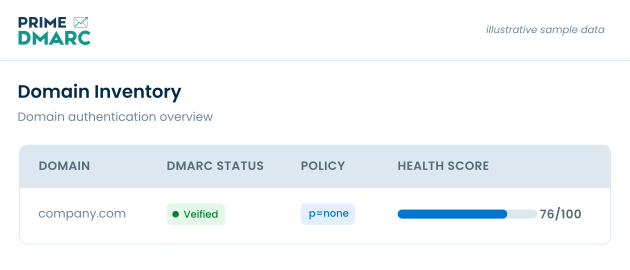
Prime DMARC turns aggregate DMARC reports into readable views of reported email activity. Explore sending sources, authentication trends, look-alike domain findings, and recommended actions to identify what needs attention.
Review Sending Sources in Detail
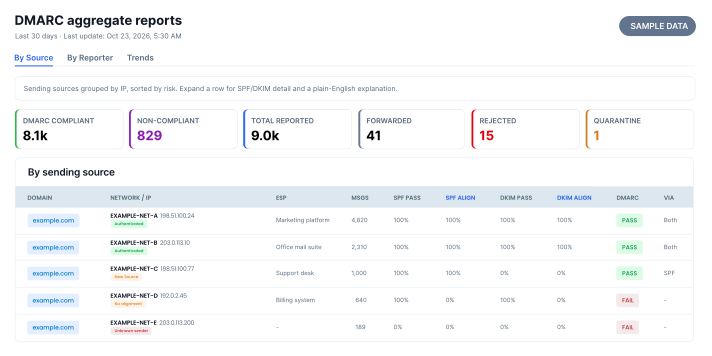
The By Source report groups reported messages by sending IP and displays message volumes alongside authentication results. Use source labels and detailed results to investigate unfamiliar activity and identify alignment issues.
- Identify sending IPs recorded in DMARC reports.
- Compare SPF, DKIM, and DMARC results for each source.
- Review message handling reported by participating receivers.
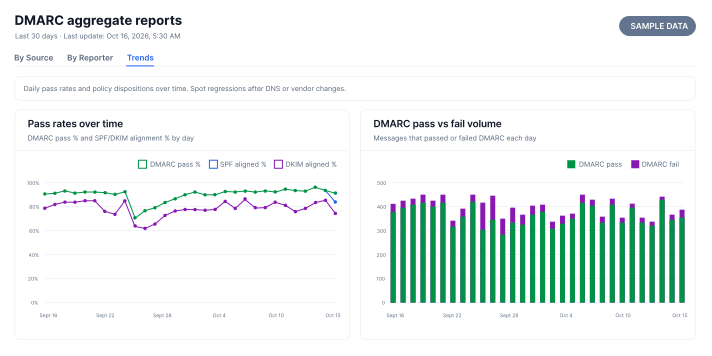
Track Email Authentication Trends Over Time
Compare daily DMARC pass rates with SPF and DKIM alignment and message volumes. Use these trends to investigate changes that may follow DNS updates or changes to sending services.
- Track the percentage of reported messages passing DMARC.
- Compare SPF and DKIM alignment across the reporting period.
- Review daily volumes of passing and failing messages.
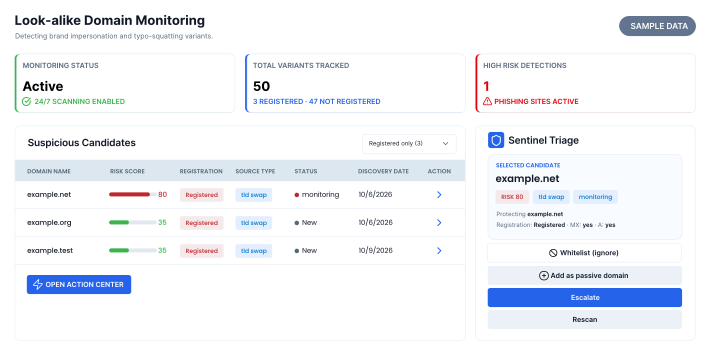
Review Look-alike Domains That Need Attention
Prime DMARC displays domain variants that resemble your monitored domain, alongside risk scores and available DNS signals. Use these findings to prioritize candidates for investigation.
- Review domain names that resemble your monitored domain.
- Assess risk scores alongside available DNS information.
- Organize candidates using the available review statuses.
A similar name or elevated score alone does not confirm malicious activity.
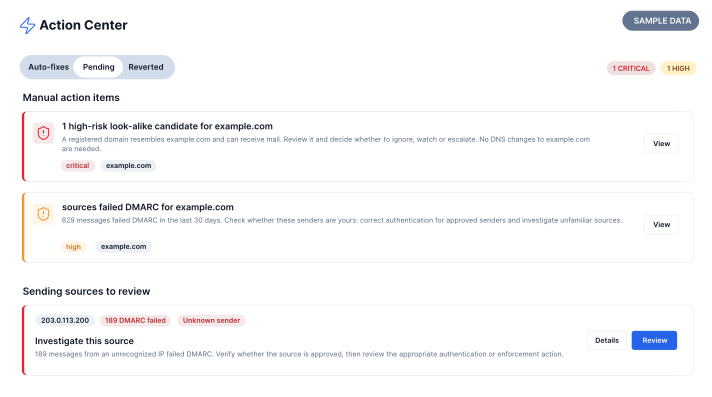
Prioritize Authentication Issues with Action Center
Prime DMARC’s Action Center brings domain warnings, failing sources, and recommended next steps into one view. Assess each finding before making changes to authentication settings or DMARC enforcement.
- Review warnings associated with monitored domains.
- Investigate sending sources with reported authentication failures.
- Evaluate suggested actions against your DNS and sender configurations.
How to Start Monitoring with Prime DMARC
Add your domain, complete the supplied DNS configuration, and review authentication reports as they arrive.
Add Your Domain
Enter the email domain you want to monitor. Start with free monitoring for one domain, or select another plan for additional domains.
Configure DNS
Follow the supplied DNS instructions for your domain. Review existing DMARC settings and preserve your current policy unless you intend to change it.
Review Reports
Review sending sources, authentication results, and message volumes as reports arrive. Reporting begins when participating email providers submit data for your domain.
Investigate Issues
Check unfamiliar sources and resolve alignment issues with legitimate senders. Review subsequent reports to assess the results before changing your DMARC enforcement policy.
Use Reporting Insights to Guide DMARC Enforcement
DMARC reports help you assess legitimate sending services before changing your policy. Review authentication failures and resolve alignment issues to reduce the risk of disrupting legitimate email.
| Policy | What It Requests | What to Review |
|---|---|---|
p=none |
No change to message handling based on DMARC failure alone. | Identify sending sources and investigate authentication failures. |
p=quarantine |
Treat messages that fail DMARC as suspicious, such as placing them in spam. |
Check whether legitimate messages are failing before tightening enforcement. |
p=reject |
Reject messages that fail DMARC. | Continue monitoring for failures as sending services and configurations change. |
p=noneEmail Authentication and Security Tools
Prime DMARC includes tools for reviewing email authentication records, preparing configurations, and investigating reported failures. Use them alongside monitoring reports to guide checks of your domain’s DNS and sending services.
DMARC Record Lookup
Inspect your published DMARC record and review its policy and reporting settings.
DMARC Record Generator
Prepare a DMARC record based on your intended policy and reporting configuration.
SPF Record Checker
Check SPF record syntax and DNS lookup usage to identify configuration issues.
SPF Flattener
Explore flattening options for complex SPF records. Review update requirements before use.
DKIM Record Lookup
Look up a specified DKIM selector and inspect the public key published in DNS.
DKIM Selector Discovery
Scan common selectors to help locate DKIM records published for your domain.
BIMI Validator
Review BIMI configuration, logo, and certificate requirements for email logo display.
MTA-STS Checker
Check MTA-STS policy and TLS reporting configuration for potential issues.
Forensic Report Parser
Upload and analyze DMARC forensic reports to investigate reported authentication failures.
Prepare Email Authentication for BIMI
DMARC enforcement is a prerequisite for BIMI. Prime DMARC helps you review reported sending sources and authentication results before moving to a p=quarantine or p=reject policy. Monitoring alone does not enable email logo display. Once authentication is ready, explore the certificate options for your logo:
Verified Mark Certificates (VMC)
For eligible registered trademark logos, with support for logo display in supported inboxes and Gmail’s blue checkmark.
Common Mark Certificates (CMC)
For eligible logos with prior use evidence, without requiring trademark registration. Logo display in supported inboxes.
Frequently Asked Questions About Prime DMARC
Find answers to common questions about Prime DMARC, its monitoring features, email authentication reports, and DMARC policy management.
What is DMARC monitoring?
Is free DMARC monitoring available with Prime DMARC?
How do I start monitoring a domain?
Can I monitor a domain that already uses quarantine or reject?
p=none, p=quarantine, or p=reject. When configuring Prime DMARC, review your existing records and the supplied instructions so your intended policy is preserved. What does the Prime DMARC report analyzer show?
Can I review reports by sending source and receiving provider?
Why aren’t DMARC reports appearing after setup?
Does the dashboard show every email sent using my domain?
Does an Unknown Sender label mean the source is malicious?
What is the difference between p=none, p=quarantine, and p=reject?
p=none requests no change in message handling based on DMARC failure alone. p=quarantine asks receivers to treat failing messages as suspicious, such as placing them in spam. p=reject asks receivers to reject failing messages. Receiving providers make the final handling decision.What should I review before changing DMARC enforcement?
How does look-alike domain monitoring help identify possible impersonation?
How does DMARC monitoring help prepare for a VMC?
Do I need DMARC enforcement for a CMC?
p=quarantine or p=reject. Businesses with an eligible established logo can get Common Mark Certificate without registering a trademark. A CMC supports logo display in supported inboxes but does not unlock Gmail’s blue checkmark.Take the Next Step with Prime DMARC
Review sending sources, understand authentication results, and identify issues that need attention with Prime DMARC.
Tell us about your domain and what you need—from monitoring and reporting to reviewing authentication issues or planning DMARC enforcement.


