


 AUD
AUD  USD
USD  GBP
GBP  CAD
CAD  INR
INR  SGD
SGD AutoSSLs: Agent-Based SSL Certificate Automation
AutoSSLs is an agent-based SSL automation system developed by SSL2BUY that runs on your server and takes over routine certificate tasks. It handles CSR generation, validation, SSL installation, and HTTPS configuration on supported servers, then replaces eligible certificates before they expire. Once configured, it reduces manual work across each certificate cycle.
Automated Certificate Renewal
Private Keys Stay on Your Server
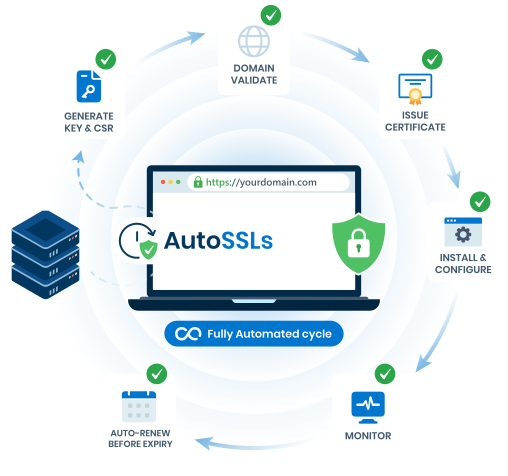
Automated SSL Certificate Management on Your Server
AutoSSLs handles the recurring steps from certificate request to deployment. The agent generates key pairs and CSRs, submits certificate requests, completes supported validation, and retrieves issued certificates. It then installs them and updates HTTPS bindings and web server configuration where needed.
The agent checks certificates on a schedule and starts automatic replacement 21 days before expiry. It applies the new certificate and updates the server configuration, reducing the steps your team needs to repeat each cycle.

CSR & Certificate Request
The agent generates a key pair and CSR on your server, then submits the CSR to request a certificate from SSL2BUY. The private key is never sent externally.

Validation
The agent completes domain validation through your selected method: an HTTP file it places automatically, a supported DNS API, or Managed DNS after a one-time CNAME setup.

Certificate Retrieval
Once issued, the agent retrieves the certificate from SSL2BUY over TLS and prepares it for installation on your server.

SSL Installation & HTTPS Setup
The agent installs the certificate and updates HTTPS bindings or web server configuration on supported servers. It reloads the web server where needed.

Replacement Before Expiry
The agent checks certificates on a schedule and starts automatic replacement 21 days before expiry. It installs the new certificate and updates HTTPS bindings.
Supported Servers and SSL Certificates
AutoSSLs automates SSL certificate management on IIS for Windows Server, Apache and NGINX for Linux, and Apache or LiteSpeed through cPanel + WHM. It can run on supported VPS, dedicated, and cloud servers with the required administrative access.

Windows ServerMicrosoft IIS

Linux ServerApache and NGINX

cPanel + WHMHosting control panel servers
Eligible SSL2BUY certificates
Compare eligible SSL certificates by brand, price, and domain coverage, with AutoSSLs support to simplify recurring certificate tasks.

- 1 Domain
- Quick Validation
- 256-bit Encryption
- Fast SSL Issuance

- 1 Domain
- Quick Validation
- 256-bit Encryption
- Fast SSL Issuance

- 3 Domains Inclusive
- Add Up to 501 standard SANs
- Add Up to 250 wildcard SANs
- Add/Remove/Replace domains
- 1 Domain
- Easy Validation
- Best Selling SSL
- FastSSL Issuance

- 2 Domains Inclusive
- Add Up to 501 standard SANs
- Add Up to 250 wildcard SANs
- Add/Remove/Replace domains
- 2 Domains Inclusive
- Add Up to 501 standard SANs
- Add Up to 250 wildcard SANs
- Add/Remove/Replace domains
- 1 Domain & Subdomains
- Easy Validation
- Multi Server Install
- Quick Issuance

- 1 Domain & Subdomains
- Easy Validation
- Cheap Wildcard SSL
- FastSSL Issuance
- 4 Domains
- Add Upto 101 SANs
- Multi Purpose
- Easy Validation
- 1 Domain & Subdomains
- Easy Validation
- Multi Server Install
- Quick Issuance
- 1 Domain & Subdomains
- Easy Validation
- Multi Server Install
- Quick Issuance

- 1 Domain
- Easy Validation
- Multi Server
- Issuance in 10 Minutes
- 2 Wildcard Domains
- Add Upto 100 Wildcard SANs
- Multi Server Licenses
- Add/Remove/Replace domains
- 1 Domain & Subdomains
- Easy Validation
- Multi Server
- Quick Issuance
- 1 Domain & Subdomains
- Easy Validation
- Multi Server
- Quick Issuance

- 1 Domain & Subdomains
- Easy Validation
- Cheap Wildcard SSL
- Multi Server
- 2 Wildcard Domains
- Add Upto 100 Wildcard SANs
- Multi Server Licenses
- Add/Remove/Replace domains
- 2 Wildcard Domains
- Add Upto 101 Wildcard SANs
- Multi Server Licenses
- Add/Remove/Replace domains

- 1 Domain & Subdomains
- Easy Validation
- Multi Server
- Immediate Issuance

- 1 Domain & Subdomains
- Easy Validation
- Secure Site Seal
- FastSSL Issuance
- 1 Domain & Subdomains
- Easy Validation
- SAN-Enabled Wildcard
- Quick SSL Issuance

Choose How Your Certificate Is Validated
AutoSSLs currently automates domain validation through file validation, a supported DNS API, or Managed DNS. Choose the method that fits your web server and DNS setup. Once configured, AutoSSLs handles recurring domain validation during certificate replacement.

File Validation
The agent places the validation file on your web server automatically, removing the need to upload it manually.
- Initial setup
- Select File Validation on your order.
- Keep in place
- The validation file must be publicly accessible over HTTP when validation runs.
- Suitable for
- Single-domain and multi-domain certificates on public web servers.

DNS API Validation
AutoSSLs connects to your DNS provider’s API to create and verify the records needed for domain validation.
- Initial setup
- Select your provider, enter the required API credentials, and click Verify & Save.
- Supported providers
- Cloudflare · AWS Route 53
- Keep in place
- Maintain valid API credentials with permission to manage validation records in the domain’s DNS zone.
- Suitable for
- Domains using supported DNS providers, including wildcard certificates.

Managed DNS Validation
Add a one-time CNAME record to delegate domain validation to SSL2BUY. AutoSSLs then handles future domain validation automatically.
- Initial setup
- Add the CNAME record provided on your order. After DNS propagation, click Verify & Save.
- Keep in place
- Retain the CNAME record while automation is active. Removing or changing it can interrupt validation and certificate replacement.
- Suitable for
- Domains where you can add a CNAME record, including those using DNS providers without API integration.
How to Get Started with AutoSSLs
AutoSSLs is activated through the Automatic Installation option on eligible SSL2BUY orders.
Order an Eligible Certificate
Buy an eligible DV certificate or open an existing eligible order in your SSL2BUY account.
Choose Automatic Installation
Select Automatic Installation on the order details page to begin configuring AutoSSLs.
Configure Domains
& Validation
Confirm your domain and technical email, add any additional domains, then configure validation.
Complete the
Setup
Select your server type and follow the setup instructions provided on your order.
Automation Is
Active
The agent requests, validates, and installs the certificate, configures HTTPS, and replaces it before expiry.
Security and Control with AutoSSLs
Automate recurring certificate tasks while retaining control over your private keys, validation method, and installation mode.

Private Keys Stay on Your Server
Private keys are generated and stored on your server. They are never transmitted externally.

Authenticated Communication
The agent communicates with SSL2BUY over TLS and authenticates using your order token.

You Choose the Validation Route
Select file validation, DNS API, or Managed DNS from the options available on your order.

Flexible Installation Options
Switch between manual and automated installation whenever you need to, directly from your order details.
Help from the SSL2BUY Team
Our support team can help you choose a compatible certificate and validation method, and complete your server setup.
Ready to Automate Your SSL Certificates?
AutoSSLs is currently available at no additional charge with eligible SSL2BUY certificate orders.
AutoSSLs Frequently Asked Questions
Straight answers about eligibility, validation, replacement and access.


